It is 6 PM on a Friday. A potential customer fills out a contact form on your website asking about pricing for a custom integration. Normally, someone on your team would see the message on Monday morning, look up the relevant details, and reply. By then, the lead has already talked to two competitors.
Now imagine a different scenario. Within seconds of that form submission, an AI agent reads the request, pulls relevant pricing information from your internal system, crafts a personalized response, and sends it to the lead. It also logs the inquiry in your CRM, tags the lead based on their industry, and schedules a follow-up task for your sales team on Monday morning.
No one on your team worked overtime. No lead fell through the cracks. This is what AI agents do — and this guide explains how they work, where they are useful, and how your business can start using them.
What Is an AI Agent?
An AI agent is a software system that can understand a goal, make decisions, use available tools and data, and complete tasks with limited human intervention.
Unlike a simple script that follows predefined instructions, an AI agent can evaluate context, choose between different options, and adapt its approach when things do not go as expected. It can work with your existing business tools — your CRM, email, databases, and web applications — to complete real workflows end to end.
The key distinction is this: a regular AI tool waits for your input and produces output. An AI agent receives a goal and figures out how to accomplish it, step by step.
How Do AI Agents Work?
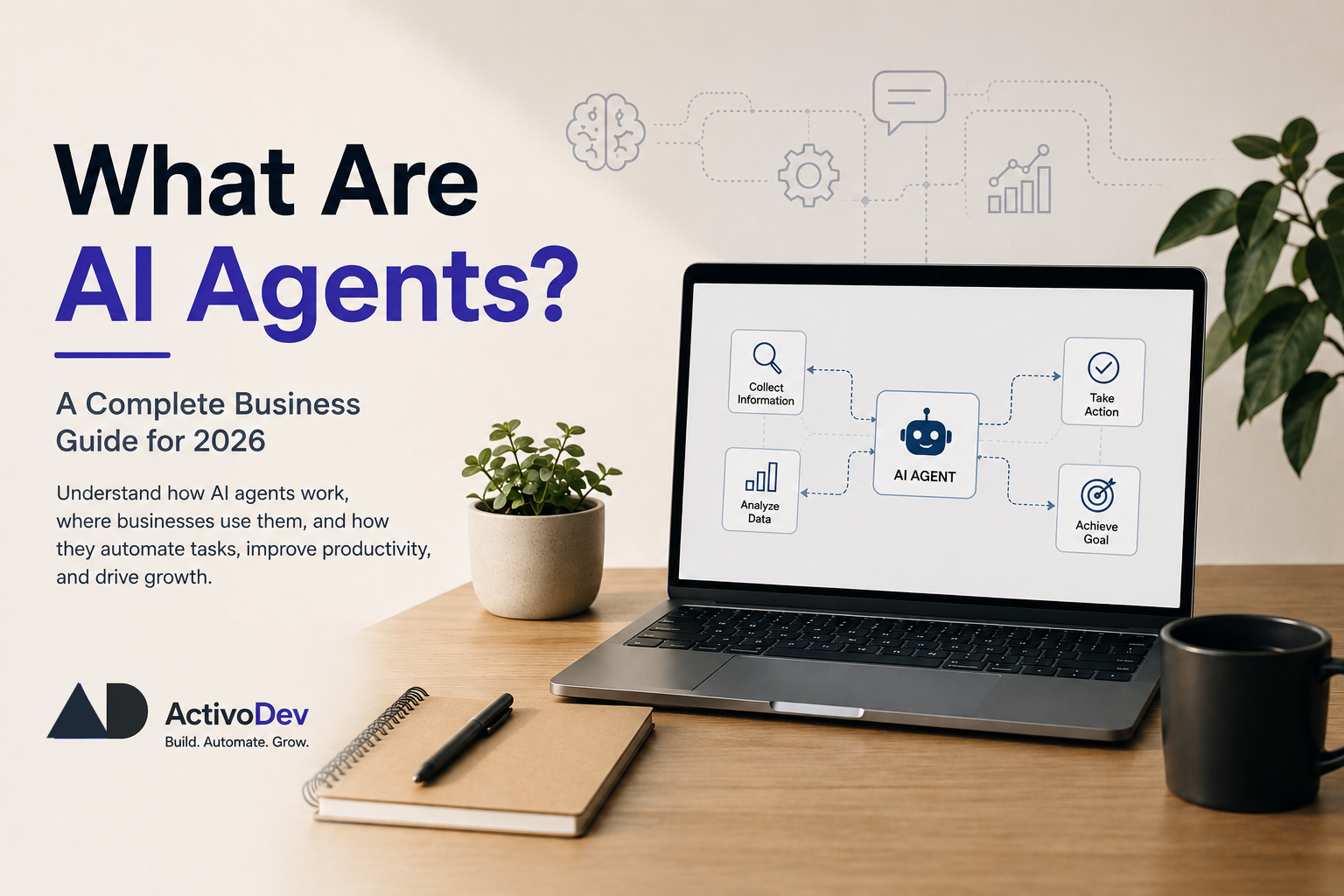
AI agents follow a clear cycle. Understanding this cycle helps you see where they fit in your business.
1. Understand the goal. The agent receives a task — either from a person or from another system. This could be as simple as "respond to this customer inquiry" or as complex as "process this invoice and update the accounting system."
2. Gather information. The agent collects the data it needs. This might come from your CRM, a database, an API, a document, or a combination of sources. It figures out what information is relevant to the task.
3. Make decisions. Based on the information gathered, the agent evaluates options. Should it respond directly? Should it escalate to a human? Should it approve the refund or flag it for review? The agent applies business logic and reasoning to choose the best path.
4. Take action. The agent executes its decision. It might send an email, update a record, call an API, generate a report, or trigger a workflow in another system.
5. Improve through feedback. Many agents learn from outcomes. If a decision leads to a good result, the agent reinforces that approach. If something goes wrong, it adjusts. Over time, this makes the agent more accurate and reliable.
This cycle can happen in seconds. That is what makes agents powerful — they can handle multi-step workflows that would otherwise require a person to manually move through each stage.
AI Agents vs Traditional Automation
Traditional automation follows fixed rules. If a condition is met, it performs an action. If not, it stops or routes to a human. It works well for simple, repetitive tasks — but it breaks down when things get unpredictable.
Take invoice processing as an example. A rule-based system can extract data from invoices that follow a specific template. But when a vendor changes their format, or when an invoice arrives in a language the rules do not cover, the system fails. Someone has to manually fix it.
An AI agent handles this differently. It reads the invoice regardless of format, understands the content, extracts the relevant fields, and processes it. If something looks unusual — say, an amount that is significantly higher than previous invoices — it can flag it for review instead of processing it blindly.
Traditional automation is rigid. AI agents are flexible. That is the fundamental difference, and it is why businesses are moving toward agents for workflows that involve judgment and variation.
AI Agents vs AI Chatbots
This is a common point of confusion, so let us clarify it.
A chatbot communicates with users. It answers questions, provides information, and carries on a conversation. A customer asks "What is my order status?" and the chatbot replies with the status. Useful, but limited.
An AI agent does more than communicate — it acts. When a customer asks the same question, the agent does not just look up the status. It checks the shipping carrier, verifies the delivery address, identifies a potential delay, proactively notifies the customer, and offers options for rescheduling the delivery.
A chatbot talks. An agent talks, decides, and does. That is why businesses looking to automate real workflows — not just answer FAQs — are investing in AI agents.
Where Businesses Use AI Agents
AI agents are showing up across departments and industries. Here are the most common use cases businesses are implementing today.
Customer Support
Agents handle tier-1 support automatically. They answer common questions, process returns, update account information, and escalate complex issues to human agents with full context. Companies using AI integration for support often see response times drop from hours to minutes.
Sales and Lead Qualification
An AI agent can engage with inbound leads, ask qualifying questions, check product fit, schedule meetings, and update your CRM — so your sales team only spends time on leads that are genuinely ready to buy.
Operations
From inventory management to logistics coordination, agents monitor systems, detect anomalies, and take corrective action. For example, an agent might notice a supply chain delay and automatically notify the procurement team while suggesting alternative suppliers.
Human Resources
Screening resumes, scheduling interviews, answering employee questions about policies, and onboarding new hires. These tasks are repetitive, rules-based, and time-consuming — exactly what agents handle well.
Finance
Reconciliation, expense categorization, report generation, and compliance checks. An agent can process financial data around the clock, flagging unusual transactions and generating reports that would take hours to compile manually.
E-commerce
AI agents manage product listings, optimize pricing based on demand and competition, handle customer inquiries, process returns, and analyze buying patterns to inform marketing decisions.
Internal Business Workflows
Any process that involves multiple steps, data lookups, and decision-making is a candidate for AI agent automation. Procurement approvals, content moderation, data entry between systems, and compliance tracking are all practical starting points.
Why Businesses Are Investing in AI Agents
The benefits are practical and measurable:
Time savings. Tasks that take hours can be completed in minutes. Your team gets back time for work that actually requires human attention.
Fewer errors. Agents follow the same process every time. They do not get tired, distracted, or skip steps. This reduces the costly mistakes that come with manual, repetitive work.
Faster responses. Customers and partners get answers immediately, not after a queue. This improves experience and creates a competitive advantage.
Better productivity. When agents handle the routine work, your team can focus on strategy, relationships, and the creative problem-solving that drives your business forward.
Scalability. When your volume increases — a product launch, a seasonal spike, rapid growth — agents scale with you without the need to hire and train additional staff.
Cost reduction. Automating repetitive workflows reduces operational costs. The math is straightforward: less manual work means lower labor costs and higher output.
These are not theoretical benefits. Businesses are seeing results within weeks of deployment.
A Simple Business Example
Let us walk through a realistic scenario so you can see how this works end to end.
A B2B software company gets 50 to 100 new leads per week from its website. Some are ready to buy. Some are just researching. Some are not a good fit at all. Currently, a sales development representative manually reviews each lead, sends an introductory email, and follows up over several days.
They build an AI agent that handles the first stage of the process:
- A lead fills out a form on the website. The agent reads the submission and understands what the lead is asking about.
- The agent checks the company's database. It pulls information about the lead's company, industry, and any previous interactions.
- The agent qualifies the lead. Based on the company size, industry, and stated needs, the agent determines whether the lead is a good fit.
- The agent responds. For qualified leads, it sends a personalized email with relevant information, case studies, and a link to schedule a meeting. For leads that are not a good fit, it sends a polite response pointing them to resources that might help.
- The agent updates the CRM. It logs the interaction, tags the lead, and creates a follow-up task for the sales team.
- The agent notifies the sales team. High-priority leads get an instant notification so a human can follow up personally.
The result: the sales team no longer spends hours reviewing and responding to every lead. They focus only on the qualified prospects that are worth their time. Response times drop from days to minutes. More leads get a timely, relevant response.
This is not a futuristic concept. Companies are building and deploying workflows like this today using custom software solutions tailored to their specific business logic.
Are AI Agents Replacing People?
This is a reasonable concern, and the honest answer is more nuanced than the headlines suggest.
AI agents are excellent at repetitive, structured, data-heavy tasks. They can follow processes, look up information, and make decisions within defined parameters — faster and more consistently than humans.
But they are not good at understanding context the way experienced people do. They cannot build trust with a client, navigate a sensitive negotiation, make a creative strategic decision, or take responsibility for outcomes that require judgment and accountability.
The businesses getting the most value from AI agents are using them to handle the repetitive 80% of certain workflows, so their people can focus on the 20% that genuinely requires human skill. Agents handle the routine. People handle the exceptions, the strategy, and the relationships.
That is a healthy division of labor, not a replacement.
Is Your Business Ready for AI Agents?
You might benefit from AI agents if any of these sound familiar:
- Your team answers the same questions repeatedly from customers or partners.
- Employees spend hours copying information between systems.
- Leads require manual follow-ups that often get delayed or forgotten.
- Reports are created manually by pulling data from multiple sources.
- Customers wait too long for responses to basic inquiries.
- Your team spends too much time on tasks that follow a predictable pattern.
If several of these are true, an AI agent is likely a practical investment — not an experiment.
How to Get Started with AI Agents
You do not need to transform your entire business overnight. Here is a practical, step-by-step approach.
- Identify one repetitive workflow. Choose a process that is well-defined, high-volume, and currently manual. Start narrow.
- Define the desired outcome. What does success look like? Faster response time? Fewer errors? Cost savings? Be specific.
- Identify the data and tools the agent needs. What systems must it access? CRM, email, databases, APIs, web applications? Map out the integrations.
- Choose the appropriate AI approach. This might be a custom-built agent, a platform solution, or integration with existing AI services. The right choice depends on your needs, budget, and technical resources.
- Test with human oversight. Deploy the agent in a controlled environment where humans can review its decisions before they go live. This builds confidence and catches edge cases.
- Measure the results. Track time saved, error rates, cost reduction, and customer satisfaction. Let the data tell you whether the agent is working.
- Expand gradually. Once the first agent proves its value, apply the same approach to adjacent workflows. Each success makes the next one easier.
Final Thoughts
AI agents are not about adding AI because it is trendy. The real value comes from solving a specific business problem — making a workflow faster, more reliable, or less costly.
The most successful implementations start with a clear pain point, not a vague desire to "use AI." When you pair AI agents with well-built business software that is designed around your specific workflows, the results compound. The agent handles the decisions and actions. The software provides the structure, data, and integrations that make those decisions possible.
If your business runs on repetitive processes, manual data handling, or slow response times, an AI agent is worth exploring. Start with one workflow. Prove the value. Then build from there.
Quick Takeaways
- AI agents understand goals, make decisions, and complete tasks with limited human intervention.
- They are different from traditional automation because they can adapt, not just follow rules.
- They are different from chatbots because they take action, not just provide answers.
- Customer support, sales, operations, HR, finance, and e-commerce are common use cases.
- Start with one repetitive workflow, prove the value, and expand from there.
- AI agents handle routine work; people handle strategy, judgment, and relationships.
Frequently Asked Questions
What is an AI agent?
An AI agent is a software system that can understand a goal, make decisions, and take actions using available data and tools. Unlike basic automation, it can adapt its approach based on context and handle multi-step workflows with minimal human oversight.
What is the difference between an AI agent and a chatbot?
A chatbot communicates — it answers questions and provides information. An AI agent does more: it communicates, makes decisions, and takes action. For example, a chatbot can tell you your order status, while an AI agent can process a return, issue a refund, and update your records.
Can small businesses use AI agents?
Yes. AI agents are not only for large enterprises. Small businesses often benefit the most because they have limited staff and repetitive tasks that consume disproportionate time. A small business might start with an agent that handles customer inquiries or automates lead follow-up.
Can AI agents connect with existing business software?
Yes. Most AI agents integrate with existing tools through APIs. They can connect to your CRM, email system, accounting software, databases, and web applications. You do not need to replace your current systems — the agent works alongside them.
How should a business start using AI agents?
Start with one repetitive workflow that has a clear outcome. Define what success looks like, identify the data and tools needed, and test with human oversight. Once the first agent proves its value, expand to other workflows gradually.